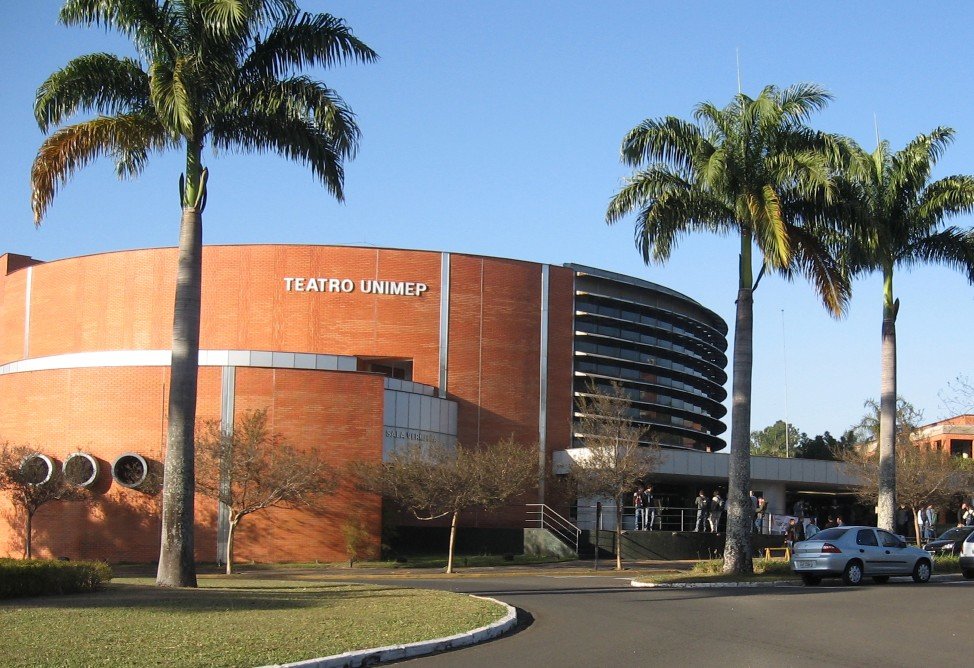
That cozy time of the year is coming. Winter is knocking on the door and the next Firebird Developers Day in Brazil is near.

Arriving at the Unimep Theater in Piracicaba
FDD is a very special event for me. In its fifth edition two years ago I got to chat with a few Firebird colleagues, show them a couple of Sinática Monitor prototypes and consolidate the idea that later became a successful product. Sinática Information Technology was born a few months later.
The sixth edition on the following year was memorable as well. I had the chance to meet a few more colleagues and establish a partnership with the nice folks at the ActiveDelphi magazine. Four articles were published out of this partnership and a fifth is due out in the June/2010 edition.
The seventh Firebird Developers Day this year will definitively taste new to me. For the first time I’ll go up on the stage and present two talks. The first will be an introduction to new Firebird 2.5 Trace API. The second will bring a practical approach to identifying and solving the most common Firebird performance problems.
I’m working hard to create two interesting, instructive and accessible talks. I have a big ‘thank you’ to Carlos Cantu for the opportunity and an invitation for you.

Come to the 7th Firebird Developers Day in Piracicaba on July the 17th, 2010. You’ll get quality talks on various themes related to Firebird. You’ll get to know in person those forum colleagues you know online only. Plus, you’ll be able to celebrate Firebird’s 10th anniversary. As the largest Firebird event in the world, FDD is not just ‘an’ event it’s ‘the’ event for Firebird users.
Sinática will be physically present at the event’s entrance and Sinática Monitor will be sold at a 50% discount that day only. Get ready and enjoy!
See you there!
Comments (1)
The new Sinática Monitor for Firebird release is available for download.
A couple of new features:
- Alarms for server log entries
- Sending alarms via email
Read what’s new and check all the detail on the release notes.
Download now!
Your ideas are always welcome. Please send your questions and suggestions to .
Comments (1)
As Firebird approaches the final 2.5 release, a new campaign is born to help increase Firebird’s visibility and awareness.
Welcome MindTheBird!
MindTheBird! provides a messaging framework, marketing materials and guidance for Firebird end-users, journalists and even competitors. We encourage all developers and enthusiasts of Firebird to be the part of this very important campaign.
The MindTheBird campaign and website are coordinated by Dmitry Kuzmenko and provide free banners, presentations and email templates to help you spread the Firebird word.
Sinática is participating along with many other tools vendors and is offering free licenses to the most active Firebird Ambassadors.
Be a Firebird Ambassador yourself.
Talk about Firebird to that friend of yours who still relies on MySql. Send some links to that previous boss of yours that insisted you had to work exclusively with expensive databases. Organize a workshop to help your co-workers get started. Let your peers know Firebird is a truly free and mature database server alternative.
Comments (21)
A beta version of our next release is available for download.
You are welcome to test it and .
The new features include:
- Send alarms via email
- Retrieve plan statements
- Alarms for server logs
The final version along with a more descriptive release notes will be made available within the next two weeks.
Please note that this is beta software. A backup of your Sinática Monitor configuration is recommended. The files are located under the {AppData}\Sinatica\Monitor folder.
Download now!
Comments (0)
EDIT Sep 21st: Sinática Monitor 2.1.03 solves the issue. You may download it now. The original bug in Firebird 2.1.3 is already fixed in CVS too.
If you’ve followed my advice and upgraded to Firebird 2.1.3 only to find you’re now getting consistent “invalid BLOB ID” messages, please update Sinática Monitor to the latest version.
There is a very specific condition that triggers this error message and it’s highly likely you won’t be affected. If you are being affected, however, please check your environment:
- In my testing the bug only occurs when there are clients attached using charset NONE. If you change them to use a proper charset such as ASCII, ISO8859_1 or UTF8 the error message will be gone. Any charset different from NONE will do. Also make sure Sinática Monitor is not using NONE charset.
- If you run into this error and it’s not related to charset NONE, please . Every additional information will be helpful.
A new version of Sinática Monitor is available to fix the issue.
Comments (1)
Yesterday Firebird 2.1.3 was made public. As with all maintenance releases its focus is stability. A number of bugs are fixed and it is a recommended update for everyone using older versions of the 2.1 series.
Default authentication method changed
The Release Notes is quick to warn about a change that may break current setups: The default authentication method changed from mixed to native. In practice this means that before 2.1.3 you could use both firebird’s native authentication and windows authentication out of the box.
From now on you have to explicitly tell Firebird that you wish to use windows authentication. Simply change the firebird.conf configuration file to:
Authentication = mixed
Lighter nBackup
Prior to 2.1.3 nBackup could exhaust server I/O resources and negatively affect database operation. Starting from Firebird 2.1.3 nBackup is lighter and can be used even when the database is heavily loaded.
Monitoring Fixes
Some fixes are specially important for Sinática Monitor users and anyone that uses monitoring tables frequently.
- Error “cannot transliterate” would happen when trying to read monitoring tables containing data from an attachment using character set NONE.
- Possible “clumplet errors” while using monitoring tables in Classic Server Linux.
- Data instability on monitoring tables while clients were connecting or disconnecting.
Other fixes
The list of bugs fixed is long and it’s easy to see that quality is the Firebird Team’s first objective. Kudos to everyone involved in this release and keep your fingers crossed for Firebird 2.5!
Comments (4)
This week I received the Brazilian Active Delphi magazine with a pleasant surprise. My very first published article.
The title is Identifying performance problems with Firebird and I write about the need to evaluate performance issues before getting down to business with application and infrastructure changes.
Big thanks to Kelver Merlotti for the invitation and to all the magazine team for the opportunity.
Comments (1)
A fresh new Sinática Monitor 2.1 for Firebird is available for download.
This release supports monitoring Firebird 2.5 databases and adds new alarms and the option to choose the layout for the Charts Page.
Find out more about what’s new or check out the release notes for a complete list of changes.
Download Sinática Monitor 2.1 right now!
Comments (3)
The sixth edition of the Brazilian Firebird Developers Day will be held in Piracicaba at the next 4th of July.
And there’s news this year: The Madness Session will let the audience ask any questions directly to the speakers. I liked this idea. Everyone knows there will be time to ask their questions.
Another good news is the presence of Vlad Khorsun, one of Firebird’s current main developers. He will present two sessions. One on CTE (Common Table Expressions) and another on What’s new in Firebird 2.5.
There are two presentations by Dmitri Kouzmenko that you just can’t miss. On one of them, entitled “Database maintenance“, he promises to show different tool to monitor the database. Is he going to mention Sinática Monitor? I have no idea.
There are two other presentations from the Brazilian folks that caught my attention: “Database Structure and Organization for websites” by Maurício Longo and “Optimizing Firebird 2.1 queries using Execute Block and nested selects” by Eduardo Jedliczka.
This event is great and I do recommend. I was there last year and certainly I will be there this year. See you!
Comments (1)
The Firebird Development Team released Firebird 2.1.2 this week. This sub-release focus on stability. There are no big changes, they’re all in store for Firebird 2.5, but it is important nonetheless. The list of bugs fixed is impressive.
Bugs
Among several fixes, some deserve to be highlighted:
- Error processing nulls in Check Constraints.
- False deadlock detection under load.
- Possible error when the same record is updated multiple times.
- Slow monitoring tables on ClassicServer under load.
- Stored Procedure statistics were not being computed in monitoring tables.
The last two bug-fixes directly affect Sinática Monitor users. This update is highly recommended.
Improvements
Besides the fixed bugs, a few improvements were included.
- DPB user restriction. If you connect to Firebird Server using a non-sysdba user and some special attachment parameter, check to see if it is in the restricted parameters list. It is also possible that your connectivity layer may be adding special parameter to your DPB. In these cases Firebird will reject the attachments.
- Possible to use MS C Runtime in a private folder. In the old days (2.0 and before), all you had to do to install a client was copy fbclient.dll to you application folder or the system folder. Runtime installation then became necessary starting from Firebird 2.1. This lead to client distribution problems as client installation became more complex. Firebird 2.1.2 allows you to once again deploy a client simply by copying fbclient.dll (or gds32.dll) and the appropriate runtime files.
To know more, visit the release notes.
Download Firebird 2.1.2 now!
Comments (2)